The Array Preference (aka Preferred Array) setting is a per-host setting that allows ActiveCluster arrays to provide guidance to each host on which of its paths are best to use for read and write operations. Communication is accomplished via ALUA protocol. Each host path ALUA property will be set to either Active/Optimized for the preferred (local) array paths or to Active/Non-Optimized for paths to the remote array. For hosts connected to both FlashArrays (aka Uniform Storage Access), using host array preferences ensures the lowest latency (shortest) paths are used for both read and write I/O to the local array. Setting an array preference will also eliminate write IO to stretched volumes having to cross the WAN links between sites twice (two round trips).
Uniform environments should enable Preferred Arrays, on the FlashArray in the host object details panel for each host, to avoid unnecessary read latency.
When To Set Array Preferences
The image below represents the logical paths that exist between the hosts and arrays, and the replication connection between the two arrays in a uniform access model. In uniform environments with significant distance (> 500 microseconds) between the two FlashArrays, the preferred-array setting should be applied to each host connected to one or more stretched volumes to ensure the host uses optimal paths to access storage. The more latency between sites the more this setting grows in importance for performance as it prevents hosts from performing reads over the longer distance connections between sites and avoids 2x WAN RTT latency on writes.
Uniform Storage Configuration (without Preferred Arrays enabled)
The image below represents a uniform storage configuration within a single site or campus environment. In this case, however, the preferred arrays option is not set. This means that the hosts will treat all paths equally, or according to whatever path selection policy the host is configured to use. This type of configuration may be used when the latency between the arrays is negligible ( < 500 microseconds) or of sufficiently short distance where any impact to performance is tolerable, such as between two racks in the same datacenter.
Non-Uniform Storage Configuration
For non-uniform storage access environments, shown in the image below, host preference offer no performance advantages or improvements. Each host only has paths to one array. In this environment, the preferred-array setting is not necessary. This configuration is used when host to array connectivity does not exist between sites.
How To Set Array Preferences
The Preferred Array setting can be modified using the kabob (3 vertical dots) at the top right corner of the Details pane for each Host. From the Pure1 GUI, click the Storage navigation button then select Hosts and click into the desired host.
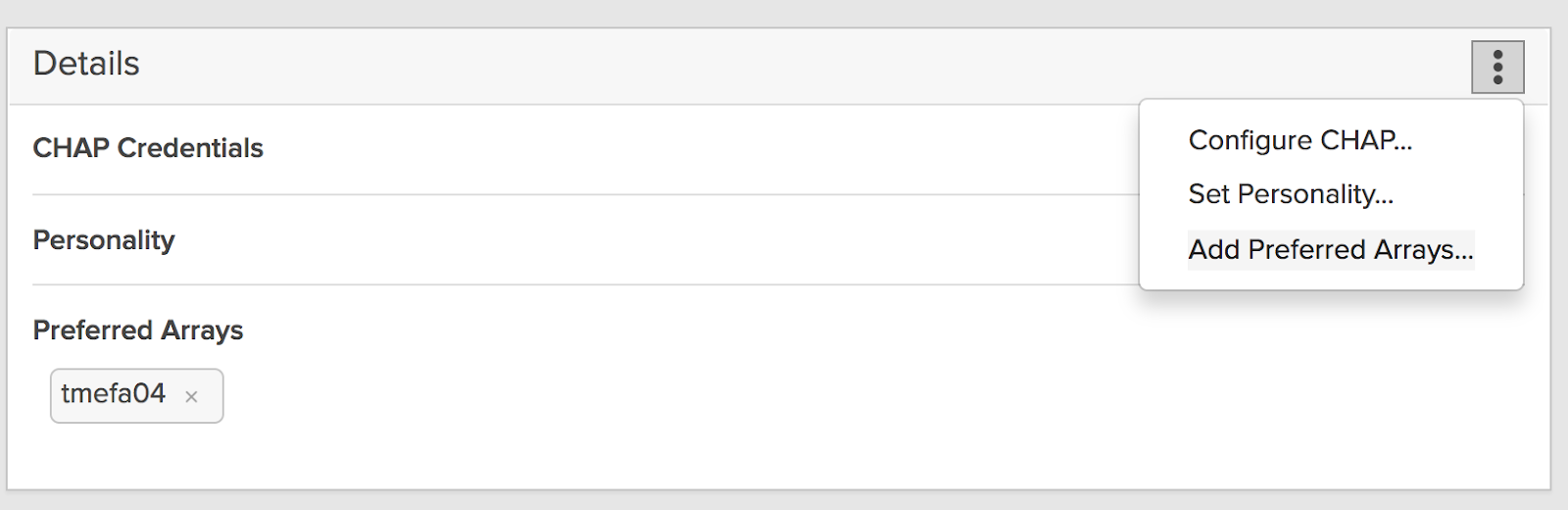
Alternatively, from the Pure CLI, use the purehost command to specify the array that is co-located or closest to the host:
pureuser@somearray> purehost setattr --preferred-array <array name>
These sections describe ActiveCluster Array Preferences, how they work, and how to use them.
ActiveCluster: Using Pod Failover Preferences
This section describes ActiveCluster Pod Failover Preferences, how they work, and when to use them.
Pod Failover Preferences Overview
When there is a need to control which FlashArray continues servicing IO to ActiveCluster volumes following the loss of the replication network, failover preferences should be set on each pod. This is especially important for non-uniform host connectivity where each server is only connected to one FlashArray.
With uniform host connectivity, it may not be possible to establish a clear delineation of FlashArray and Application Server site. When virtual machines or applications are being run on multiple servers at different sites while their backing storage is on the same stretched pod volumes, there may not be a clear preference. In this case, setting no preference is acceptable. Alternatively, it may be preferable to group applications and/or virtual machines that depend on the same stretched pod volumes onto servers at just one site or the other. In this way, a preference can be determined and the need to restart applications following the loss of replication links or cross-site host connectivity can be minimized.
Make Your Preference Known!
Active/Active datacenters often have workloads that tend to run at one site or at the other. The site that applications tend to run in may be determined by historical convention, administrative convenience, infrastructure disparity, primary user location, or any of a number of other reasons. When ActiveCluster performs a mediator race following the loss of the synchronous replication links between data centers, the outcome of the resulting race to the mediator can be unpredictable. For non-uniform host connectivity, the lack of mediator race predictability can mean a disruptive restart for applications running on stretched pod volumes in the losing FlashArray.
The pod failover preference capability enables administrators to align pod failover behavior with the site where each application tends to run. Functionally, the failover preference feature gives the preferred FlashArray for each pod a head start in its race to the mediator. The key advantage of a failover preference setting compared to a fixed site bias is that a failover preference allows the non-preferred array to win the race to the mediator if the preferred site fails. A static or fixed bias can lead to a total cluster outage as the non-preferred array must suspend IO regardless of what happens to the preferred array. Set the pod failover preference so that it aligns the FlashArray and application server(s) at the same physical site.

In the illustration above, the stretched pod containing volume A prefers Site A (preference is indicated by the orange letter P at the top left corner of the A pod). Due to the head start it is given, Pod A is more likely to win its race to the mediator and stay online at Site A. The second pod with volume B prefers site B (preference is indicated by the orange letter P at the top right corner of the B pod). Pod B is more likely to stay online at Site B after winning its race to the mediator. In this way, site and array alignment with applications can be established allowing hosts to continue without the need for disruptive restart. More detail is provided in the host connectivity section of this document.
Setting a failover preference for pods supporting clustered applications running on non-uniformly connected hosts is a recommended best practice.
Aligning Failover Preferences Is Critical For Non-Uniform Host Connectivity
A host with non-uniform connectivity will distribute its IO across local paths according to its path selection policy as it has no paths to the remote FlashArray. When no failover preference is set, if there is a single array outage or the loss of both replication links, any applications or VMs accessing volumes on the failed FlashArray or from the losing FlashArray pod must be restarted on servers with connectivity to the winning FlashArray and winning pod. The VM and/or application restart may be automatic, depending on the type of clustering software deployed in the host layer. The surviving FlashArray must have Mediator access in order to continue servicing IO for any stretched pod volumes. Setting a failover preference on each FlashArray pod allows the ActiveCluster administrator to define which FlashArray he would prefer to continue servicing pod volumes if both synchronous replication links are lost. By aligning the pod failover preference setting with the local FlashArray that servers and their applications are connected to, the chance of disruption due to of replication links (shown above) can be largely mitigated. Pods will remain online at both FlashArrays depending on their failover preference setting and depending on the outcome of the mediation race.
Management network contact with the Mediator is required for each FlashArray to complete its race and to allow the preferred pod's stretched volumes to remain accessible to hosts.
Setting Pod Failover Preference
Pod failover preference for each pod can be set using the Pure1 GUI or CLI:
Example 1: Using the Pure GUI:
Click Storage > Pods > Pod Name and then click on the kabob menu at the top right corner of the Details Tile:
Example 2: Using CLI to set the pod failover preference:
local-array> purepod setattr --failover-preference array-name pod-name